
Ceci est une ancienne révision du document !
Table des matières
Power Monitoring Expert
Cette page concerne la partie software de Power Monitoring Expert
Documentations
Logiciel PME - Schneider Electric
| Fichier | Formation | Version |
|---|---|---|
| pme_8.1_project_deployment_-_student_workbook.pdf | Student Workbook | 8.1 |
| pme_8.1_application_modules_-_configuration_guide.pdf | Application modules | 8.1 |
| pme_8.1_before_installing_your_software_7en52-0383-00.pdf | Before installing your software | 8.1 |
| pme_8.1_design_guide.pdf | Design Guide | 8.1 |
| pme_8.1_installation_-_it_infrastructure_preparation_guide.pdf | Installation - IT Infrastructre Preparation Guide | 8.1 |
| pme_8.1_installation_guide_7en02-0380-00.pdf | Installation Guide | 8.1 |
| pme_8.1_user_guide_7en02-0379-00.pdf | User guide | 8.1 |
| pme_8.1_using_the_sql_server_2012_dvd_7en52-0391-00.pdf | Using the SQL Server 2012 DVD | 8.1 |
| pme_8.1_using_the_sql_server_2014_dvd_7en52-0397-00.pdf | Using the SQL Server 2014 DVD | 8.1 |
| pme_8.1_web_applications_help_topics_7en52-0384-00.pdf | Web Application Help | 8.1 |
| pme_8.1_what_s_new_7en12-0293-00.pdf | What's new | 8.1 |
| pme_v8.0_hierarchy_configuration_guide.pdf | Hierarchy configuration guide | 8.0 |
| pme_v8.0_hierarchy_manager_help_topics.pdf | Hierarchy Manager Help topics | 8.0 |
| pme_licensing_guide_1.4.pdf | Licensing guide | 7.2.x - 8.x |
| standard_scope_of_work.zip | Standard Scope Of Work | 8.1 |
| 00_-_welcome_to_pme_project_deployment.pptx | Présentation PPT 00 - Welcome to PME Project Deployment | 8.1 |
| 01_-_pme_architecture.pptx | Présentation PPT 01 - PME Architecture | 8.1 |
| 02_-_the_standard_scope_of_work.pptx | Présentation PPT 02 - The Standard Scope of Work | 8.1 |
| 03_-_prior_to_startup.pptx | Présentation PPT 03 - Prior to Startup | 8.1 |
| 04_-_software_installation.pptx | Présentation PPT 04 - Software installation | 8.1 |
| 05_-_meter_wiring_and_configuration.pptx | Présentation PPT 05 - Meter Wiring and Configuration | 8.1 |
| 06_-_communication_and_device_management.pptx | Présentation PPT 06 - Communication and Device Management | 8.1 |
| 07_-_logging_setup.pptx | Présentation PPT 07 - Logging Setup | 8.1 |
| 08_-_alarms_configuration.pptx | Présentation PPT 08 - Alarms Configuration | 8.1 |
| 09_-_alarm_and_event_notification.pptx | Présentation PPT 09 - Alarm and Event Notification | 8.1 |
| 10_-_waveform_capture_setup.pptx | Présentation PPT 10 - Waveform Capture Setup | 8.1 |
| 11_-_graphic_screens_configuration.pptx | Présentation PPT 11 - Graphic Screens configuration | 8.1 |
| 12_-_trends_configuration.pptx | Présentation PPT 12 - Trends configuration | 8.1 |
| 13_-_dashboard_configuration.pptx | Présentation PPT 13 - Dashboard Configuration | 8.1 |
| 14_-_reports_configuration.pptx | Présentation PPT 14 - Reports Configuration | 8.1 |
| 15_-_database_maintenance_configuration.pptx | Présentation PPT 15 - Database Maintenance Configuration | 8.1 |
| 16_-_system_backup.pptx | Présentation PPT 16 - System Backup | 8.1 |
| 17_-_course_summary.pptx | Présentation PPT 17 - Course Summary | 8.1 |
| a_-_system_programming_in_designer.pptx | Présentation PPT A - System Programming in Designer | 8.1 |
| powermanagersettings.zip | Power Manager Settings + PME8_delete_device_v3.sql | 8.1 - 8.2 |
| configuration_manager_v2.1.0.zip | Configuration Manager (outil de sauvegarde de config PME) | 8.2 |
| datasourcebus.datasourcetopic.xlsx | Liste des types de données PME | 8.2 |
| mdi_parameter_calc_for_comx_ai.xlsx | Configuration des entrées analogiques d'une ComX dans MDI | 8.2 |
| pme9.0_presentation_detaillee.pdf | 9.0 | |
| pme_9.0_system_guide.pdf | 9.0 | |
| pme_2020_system_guide.pdf | 2020 |
Dossier interne répertoriant tous les documents et les dévellopements PME :
P:\Projets\_Projets_Internes\AI022-PME Expert
Dossier interne répertoriant tous les fichiers d'installations de PME :
\\nas\5 - Logiciels\Automatisme\0. SCHNEIDER\Autre (Sepam, STB, Drives,….)\PME
Formation
Accès VmWare
Il existe une plateforme PME de formation accessible via une vmware héberger:
https://srv-indus/ui/#/login
User : Root
Mdp : Aut@ind2019
Démarrer la console distant
Depuis le navigateur à gauche aller dans :
Machines virtuelles\PME_formation
Puis depuis l'onglet Console faire Lancer la console distante
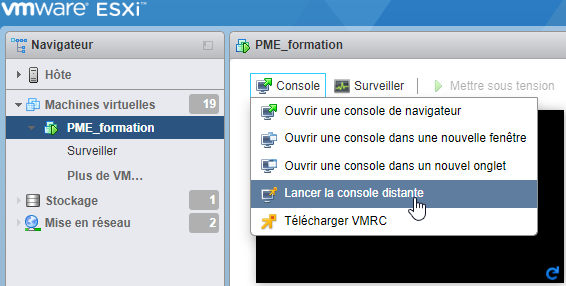
Il vous sera demander : Ouvrir VMware Player ?
Cliquer sur Ouvrir VMware Player
Une fenêtre VMwarePlayer doit se lancer
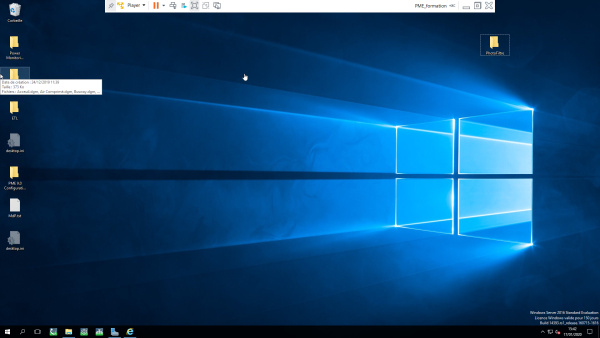
Web Applications
C'est l'application intitulé Web Applications qui se charge de cela.
Depuis le menu démarrer vous pouvez lancer l'interface Web de PME.
\\Schneider Electric\ Web Applications
User : supervisor
Mdp : Aut@ind2009
Une fois connecté vous serez dans l'environnement Web de PME.
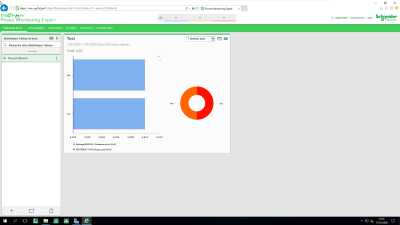
L'interface WEB permet d'intégrer des tableaux de bord, des diagrammes, des tendances, la visualisation d'alarmes, des rapports et le paramètrage d'interface de Web Applications.
Sous-chapitre 1
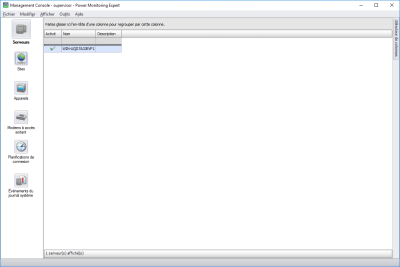
Management Console
Utilisez Management Console pour ajouter, supprimer ou configurer des composants système, tels que des dispositifs de mesure, dans votre système de gestion de l'alimentation PME.
Vous pouvez configurer différents types de sites (liaisons de communication telles que Ethernet ou série) et établir des plannings de connexion pour ces sites.
En outre, le menu MC Tools permet d'accéder aux outils de configuration, de maintenance et de programmation des périphériques et du système.
Il est nécessaire de se connecter avec un compte administrateur.
user : supervisor
Mdp : Aut@ind2009
Sous-chapitre 1
Vista
Sous-chapitre 1
Designer
Sous-chapitre 1
Outils de la page


