
Ceci est une ancienne révision du document !
Table des matières
Power Monitoring Expert
Cette page concerne la partie software de Power Monitoring Expert
Documentations
Logiciel PME - Schneider Electric
| Fichier | Formation | Version |
|---|---|---|
| pme_8.1_project_deployment_-_student_workbook.pdf | Student Workbook | 8.1 |
| pme_8.1_application_modules_-_configuration_guide.pdf | Application modules | 8.1 |
| pme_8.1_before_installing_your_software_7en52-0383-00.pdf | Before installing your software | 8.1 |
| pme_8.1_design_guide.pdf | Design Guide | 8.1 |
| pme_8.1_installation_-_it_infrastructure_preparation_guide.pdf | Installation - IT Infrastructre Preparation Guide | 8.1 |
| pme_8.1_installation_guide_7en02-0380-00.pdf | Installation Guide | 8.1 |
| pme_8.1_user_guide_7en02-0379-00.pdf | User guide | 8.1 |
| pme_8.1_using_the_sql_server_2012_dvd_7en52-0391-00.pdf | Using the SQL Server 2012 DVD | 8.1 |
| pme_8.1_using_the_sql_server_2014_dvd_7en52-0397-00.pdf | Using the SQL Server 2014 DVD | 8.1 |
| pme_8.1_web_applications_help_topics_7en52-0384-00.pdf | Web Application Help | 8.1 |
| pme_8.1_what_s_new_7en12-0293-00.pdf | What's new | 8.1 |
| pme_v8.0_hierarchy_configuration_guide.pdf | Hierarchy configuration guide | 8.0 |
| pme_v8.0_hierarchy_manager_help_topics.pdf | Hierarchy Manager Help topics | 8.0 |
| pme_licensing_guide_1.4.pdf | Licensing guide | 7.2.x - 8.x |
| standard_scope_of_work.zip | Standard Scope Of Work | 8.1 |
| 00_-_welcome_to_pme_project_deployment.pptx | Présentation PPT 00 - Welcome to PME Project Deployment | 8.1 |
| 01_-_pme_architecture.pptx | Présentation PPT 01 - PME Architecture | 8.1 |
| 02_-_the_standard_scope_of_work.pptx | Présentation PPT 02 - The Standard Scope of Work | 8.1 |
| 03_-_prior_to_startup.pptx | Présentation PPT 03 - Prior to Startup | 8.1 |
| 04_-_software_installation.pptx | Présentation PPT 04 - Software installation | 8.1 |
| 05_-_meter_wiring_and_configuration.pptx | Présentation PPT 05 - Meter Wiring and Configuration | 8.1 |
| 06_-_communication_and_device_management.pptx | Présentation PPT 06 - Communication and Device Management | 8.1 |
| 07_-_logging_setup.pptx | Présentation PPT 07 - Logging Setup | 8.1 |
| 08_-_alarms_configuration.pptx | Présentation PPT 08 - Alarms Configuration | 8.1 |
| 09_-_alarm_and_event_notification.pptx | Présentation PPT 09 - Alarm and Event Notification | 8.1 |
| 10_-_waveform_capture_setup.pptx | Présentation PPT 10 - Waveform Capture Setup | 8.1 |
| 11_-_graphic_screens_configuration.pptx | Présentation PPT 11 - Graphic Screens configuration | 8.1 |
| 12_-_trends_configuration.pptx | Présentation PPT 12 - Trends configuration | 8.1 |
| 13_-_dashboard_configuration.pptx | Présentation PPT 13 - Dashboard Configuration | 8.1 |
| 14_-_reports_configuration.pptx | Présentation PPT 14 - Reports Configuration | 8.1 |
| 15_-_database_maintenance_configuration.pptx | Présentation PPT 15 - Database Maintenance Configuration | 8.1 |
| 16_-_system_backup.pptx | Présentation PPT 16 - System Backup | 8.1 |
| 17_-_course_summary.pptx | Présentation PPT 17 - Course Summary | 8.1 |
| a_-_system_programming_in_designer.pptx | Présentation PPT A - System Programming in Designer | 8.1 |
| powermanagersettings.zip | Power Manager Settings + PME8_delete_device_v3.sql | 8.1 - 8.2 |
| configuration_manager_v2.1.0.zip | Configuration Manager (outil de sauvegarde de config PME) | 8.2 |
| datasourcebus.datasourcetopic.xlsx | Liste des types de données PME | 8.2 |
| mdi_parameter_calc_for_comx_ai.xlsx | Configuration des entrées analogiques d'une ComX dans MDI | 8.2 |
| pme9.0_presentation_detaillee.pdf | 9.0 | |
| pme_9.0_system_guide.pdf | 9.0 | |
| pme_2020_system_guide.pdf | 2020 |
Dossier interne répertoriant tous les documents et les dévellopements PME :
P:\Projets\_Projets_Internes\AI022-PME Expert
Dossier interne répertoriant tous les fichiers d'installations de PME :
\\nas\5 - Logiciels\Automatisme\0. SCHNEIDER\Autre (Sepam, STB, Drives,….)\PME
Formation
Accès VmWare
Il existe une plateforme PME de formation accessible via une vmware héberger:
https://srv-indus/ui/#/login
User : Root
Mdp : Aut@ind2019
Démarrer la console distant
Depuis le navigateur à gauche aller dans :
Machines virtuelles\PME_formation
Puis depuis l'onglet Console faire Lancer la console distante
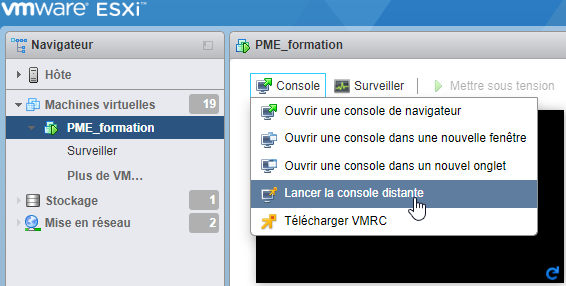
Il vous sera demander : Ouvrir VMware Player ? Cliquer sur Ouvrir VMware Player
Web Applications
Sous-chapitre 1
Management Console
Sous-chapitre 1
Vista
Sous-chapitre 1
Designer
Sous-chapitre 1
Outils de la page


